Frequently the BPEL instances are getting rolled back with
the following exception.
The root cause of the
issue is, JTA transaction getting timeout before completing the execution of
the BPEL instance; the JTA transaction should be active to complete the
execution successfully.
[2012-04-26T05:15:45.139+00:00]
[SOA1] [ERROR] [] [oracle.soa.bpel.engine] [tid:
orabpel.invoke.pool-4.thread-23] [userId: <anonymous>] [ecid:
0000JRh3heOAxGoqwSuXMG1F_qb^000aP5,0:1:100080683] [APP: soa-infra]
[composite_name: AM_Invoker] [component_name: AM_Invoker]
[component_instance_id: 5977508] The reason was The execution of this instance
"5977508" for process "AM_Invoker" is supposed to be in an
active jta transaction, the current transaction status is
"MARKED_ROLLBACK" . Root cause: null
[APP: soa-infra] Error while invoking bean
"cube delivery": JTA transaction is not in active state.[[
The transaction became
inactive when executing activity "5977508-BpInv1-BpSeq9.78-2" for
instance "5,977,508", bpel engine cannot proceed further without an
active transaction. please debug the invoked subsystem on why the transaction
is not in active status. the transaction status is "MARKED_ROLLBACK".
Message handle
error.error while attempting to process the message
"com.collaxa.cube.engine.dispatch.message.invoke.InvokeInstanceMessage";
the reported exception is: Transaction Rolledback.:
weblogic.transaction.internal.TimedOutException: Transaction timed out after
301 seconds
BEA1-2980B7B48F411EE46991
Solution:
Increase the JTA time out and the BPEL EJB transaction
timeout.
Change the JTA
transaction timeout:
Change the BPEL EJB
transaction timeout settings:
BPELActivityManagerBean
BPELEngineBean
BPELInstanceManagerBean
BPELProcessManagerBean
BPELServerManagerBean
There is no standard value for transaction timeout property.
We need to trail out and set the value.
If the component still fails with the transaction timeout
error then revisit the component design and tune the same.
|
Sunday, December 16, 2012
weblogic.transaction.internal.TimedOutException:Transaction timed out after 301 seconds – Oracle SOA 11g
########

Proxy Configuration in SOA 11g
If
we are invoking any web services and it needs to be passed through Proxy then the
proxy server details should be configured on soa11g server. In SOA11g we have
two ways of configuring the proxy. The first way is to configure the Server
Level and the second level is Composite level.
Configuration
can be done using Enterprise manager/JDeveloper
1)
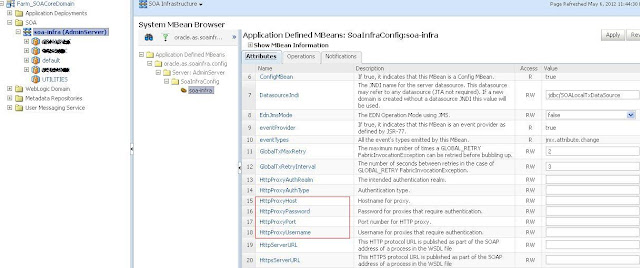
Server Level from EM console:
Login to the em console
Navigate to SOA Infrastructure->SOA
Administration->Common Properties -> More SOA Infra Advanced
Configuration Properties...
Enter the HttpProxyHost, HttpProxyPort,
HttpProxyUsername and HttpProxyPassword
Click on Apply and then restart Server
2)
Composite service Level from EM console:
If we want to configure the configure proxy
only to a particular composite the can be configured in composite Level.
Navigate to the Process in EM and in the
dashboard click on the Service (Adapter used to invoke the web service to which
the proxy is required) under the Services and References section.
Click on the properties tab and you can
find the different properties as shown below where you can fill the Proxyhost,
ProxyPort.

3)
Setting Composite service Level from JDeveloper:
Open the Composite.xml and select the
service to which the proxy configuration is required.
Add the binding properties
oracle.webservices.proxyHost, oracle.webservices.proxyPort
Click on Save.
 |
########
Subscribe to:
Posts (Atom)