The Oracle File and FTP Adapters use the following threading models:
In the default threading model, a poller is created for each inbound Oracle File or FTP Adapter endpoint. The poller enqueues file metadata into an in-memory queue, which is processed by a global pool of processor threads. We can set the thread count of global processor through the oracle.tip.adapter.file.numProcessorThreads property at the pc.properties file. Create pc.properties file with this property and copy it to server and then reference it in the WLS classpath in setDomainEnv.sh.  The following steps highlight the functioning of the default threading model:
Modified Threading Model:
We can modify the default threading behavior of Oracle File and FTP Adapters. Modifying the threading model results in a modified throttling behavior of Oracle File and FTP Adapters. The following sections describe the modified threading behavior of the Oracle File and FTP Adapters:
Single Threaded Model:
The single threaded model is a modified threaded model that enables the poller to assume the role of a processor. The poller thread processes the files in the same thread. The global pool of processor threads is not used in this model. You can define the property for a single threaded model in the inbound JCA file as follows: <activation-spec className="oracle.tip.adapter.file.inbound.FileActivationSpec"> <property../> <property name="SingleThreadModel" value="true"/> <property../> </activation-spec> Partitioned Threaded Model: The partitioned threaded model is a modified threaded model in which the in-memory queue is partitioned and each composite application receives its own in-memory queue. The Oracle File and FTP Adapters are enabled to create their own processor threads rather than depend on the global pool of processor worker threads for processing the enqueued files. You can define the property for a partitioned model in the inbound JCA file as follows: <activation-spec className="oracle.tip.adapter.file.inbound.FileActivationSpec"> <property../> <property name="ThreadCount" value="4"/> <property../> </activation-spec> In the preceding example for defining the property for a partitioned model:
|
Sunday, December 16, 2012
File/FTP Adapter Threading Model – Oracle SOA 11g
########

Deployment plan file to replace the JCA Adapters properties – Oracle SOA 11g
We can create and edit a
configuration plan file in which we can replace the following attributes and
properties:
The configuration plan does not
alter XSLT artifacts in the SOA composite application. If you want to modify
any XSL, do so in the XSLT Mapper. Using a configuration plan is not useful.
For example, you cannot change references in XSL using the configuration plan
file. Instead, they must be changed manually in the XSLT Mapper in Oracle
JDeveloper when moving to and from test, development, and production
environments.
Generate the Plan file:
The plan file can be generated
through JDeveloper or through ANT script.
Generating Plan file through
JDeveloper:
Right Click on Composite.xml and
click on generate config Plan.

Change the generated plan file
contents accordingly to replace the properties and attributes of the
composites.
Change the wsdlAndSchema section accordingly to replace the WSDL location and
the schemaLocation of the WSDL’s and XSD’s
<wsdlAndSchema
name="ExplorePlanFile.wsdl|FileAdapter_file.jca|FileAdapter.wsdl|xsd/AA_table.xsd|xsd/ExplorePlanFile.xsd">
<searchReplace>
<search>http://localhost:7001/</search>
<replace>http://10.15.23.24:8004/</replace>
</searchReplace>
</wsdlAndSchema>
By default the wsdlAndSchema section
will include the jca files to replace the JCA file properties.
The default configuration as shown
below is not replacing the jca properties after the deployment of the
composite.
<wsdlAndSchema name="FileAdapter_file.jca|FileAdapter.wsdl|xsd/AA_table.xsd|xsd/ExplorePlanFile.xsd">
<searchReplace>
<search>D://Albin/Files</search>
<replace>D://Albin/Files/Sample</replace>
</searchReplace>
</wsdlAndSchema>
The same should be changed as shown
below to replace the JCA adapter properties
File Adapter properties:
<wsdlAndSchema
name="FileAdapter_file.jca">
<jca:property
name="PhysicalDirectory">
<searchReplace>
<search>D://Albin/Files</search>
<replace>D://Albin/Files/Sample</replace>
</searchReplace>
</jca:property>
<jca:property
name="Append">
<searchReplace>
<search>false</search>
<replace>true</replace>
</searchReplace>
</jca:property>
</wsdlAndSchema>
MQ Adapter properties:
<wsdlAndSchema
name="ENQ_GE_EI_EAI_TRIGGER_mq.jca|OrderStatusMonitorMQAdp_mq.jca">
<jca:property
name="QueueName">
<searchReplace>
<search>S_Order_Queue</search>
<replace>P_Order_Queue</replace>
</searchReplace>
</jca:property>
</wsdlAndSchema>
The same searchReplace can be used
to replace all the JCA adapters’ properties.
Attaching the plan file while
deploying the composite from JDeveloper:
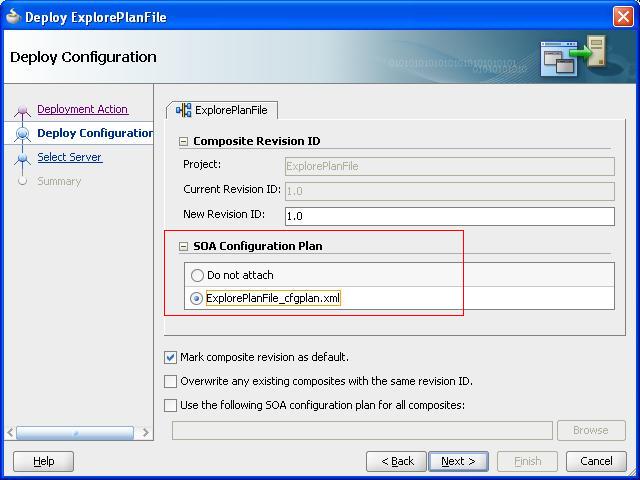
The plan file can be attached through ant script during the deployment
of the composite to the server.
<ant antfile="${oracle.home}/bin/ant-sca-deploy.xml" inheritAll="false"
target="deploy"> <property name="wl_home" value="${wl_home}"/> <property name="oracle.home" value="${oracle.home}"/> <property name="serverURL" value="${soa.cluster.serverURL}"/> <property name="user" value="${soa.user}"/> <property name="password" value="${soa.password}"/> <property name="overwrite" value="${soa.composite.overwrite}"/> <property name="forceDefault" value="${soa.composite.forceDefault}"/> <property name="sarLocation" value="${deploy.sarLocation}"/> <property name="configplan" value="${deploy.configplan}"/> </ant> |
########
Subscribe to:
Posts (Atom)